
Beat sync video editor for iPhone

Your clips.
Cut on the beat.

Content Maxer turns your raw clips into beat-synced edits for TikTok and Reels. Keep your best seconds, add a song, tap Generate. Every cut lands on the music.

Free download · 7-day free trial on the yearly plan, then a subscription is required · iPhone

Content Maxer: a finished beat-synced edit saved to Photos
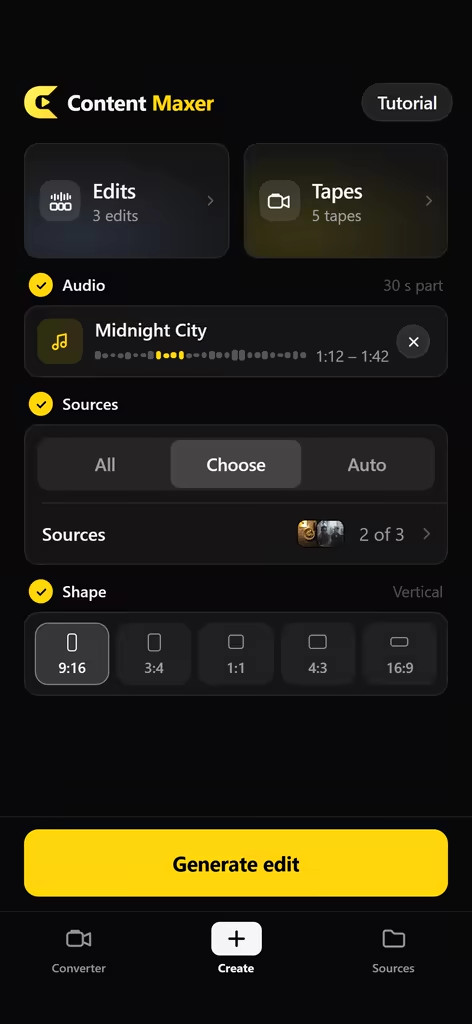
Content Maxer Create screen: a song, two Sources and the 9:16 format, ready to generate
On the beatMidnight City · 1:12–1:42
100% on-deviceNo account · no uploads
  • Processed on your iPhone
  • No account, no uploads
  • 9:16 · 3:4 · 1:1 · 4:3 · 16:9
  • Save to Photos, share anywhere

Converter

A new feel. Same memories.

Give any video an authentic camcorder look. Drag to compare the original iPhone clip with the Content Maxer render.

Original Camcorder

Real footage, converted on an iPhone. Nothing added in post.

How it works

From camera roll to finished edit.

Curate once, generate whenever you have a new song. The work moves from the timeline to your library.

01 · SOURCES

Build a library of Sources.

Pick videos from your camera roll and group them into Sources: Summer trip, Paris, Night drive. Only the moments you keep are stored, ready for every future edit.

  • Add videos straight from Photos
  • Organise by trip, place or vibe
  • Import a Source a friend sent you
A Source called Summer trip: nine kept seconds from two videos
02 · PICK SECONDS

Keep the exact second.

Drag the yellow window across the video, fine-tune it to the frame and tap Keep. Every cut in your edit is a moment you chose.

  • Frame-accurate fine-tune ruler
  • Keep as many seconds per video as you like
  • Moments you already kept are marked
Pick your moments: a one-second window on the video timeline with a Keep this second button
03 · GENERATE

Tap Generate. It cuts on the beat.

Add a song, or extract the audio from any video, and choose the part you want. Content Maxer detects the beats and cuts your moments to the music. A new edit every time.

9:163:41:14:316:9
  • Save to Photos, send to Instagram, or share to any app
  • Optional “Made with Content Maxer” ending
A generated edit, saved to Photos, with Share and a #contentmaxerapp hashtag to copy
04 · CAMCORDER LOOK

An authentic camcorder look.

Upload any video and the Converter renders a calibrated camcorder look into every frame: softer detail, subtle grain, warm lifted tones and a gentle vignette. Or switch to Film and shoot camcorder-style clips directly.

  • Film mode with flash, zoom rocker and formats
  • Converted and filmed videos collect in Tapes
  • Rendered into the file, so it survives the upload

More about the camcorder look →

The Converter: original and camcorder look side by side, with a Choose a video button

Thoughtful, down to the details.

Import from a friend

Your friend exports a Source as a video and sends it by AirDrop or Messages. Pick it in Content Maxer and every second lands in your library, ready to generate.

Import from a friend: a shared source video becomes 30 clips

Tapes

Every converted or filmed video is collected in Tapes, ready to watch again, save or share.

Built-in tutorial

A short walkthrough gets you from an empty library to your first edit in minutes.

Your ending, your call

Add a “Made with Content Maxer” ending to your edits, or leave it off.

Share in one tap

Save to Photos, hand your edit straight to Instagram, or send it to TikTok and any other app from the share sheet.

#contentmaxerapp

Privacy

Your footage never leaves your iPhone.

Beat detection, editing and the camcorder render all run on-device. There is no account to create and nothing is uploaded to us.

  • No accountNo sign-up, no login, no email needed.
  • No uploadsYour photos, videos and music stay on your device.
  • No ads, no trackingNo ad SDKs and no cross-app tracking.
  • Read the detailsPrivacy Policy →

Made for the edits people actually post.

Content Maxer does one job: beat-synced montages from your own footage, plus a real camcorder look. If that is the edit you make every week, it is the fastest way there.

Travel montages

Thirty clips from a week away, one song, fifteen seconds. Make a Source per trip, keep the good seconds and generate. Not quite it? Generate again.

TikTok edits

The edits community lives on hard cuts that hit the beat. Content Maxer gives you that without keyframes. Pair it with the camcorder look for the tape aesthetic.

Weekly content from one shoot

Shoot once, keep your best moments and pull a fresh edit for every new song. Your library keeps growing with every video you add.

Brands, venues and small teams

A restaurant, gym or event space can keep one Source per location and cut an on-brand recap for every new track.

Content Maxer compared with a timeline editor
TaskTimeline editorContent Maxer
Cut clips to the beatManual, or a beat templateAutomatic, from the song you pick
Reuse your clips next weekRe-import and re-trimAlready in your Sources
A different edit each timeStart overTap Generate again
Camcorder look rendered into the exportFilter packsBuilt in, plus Film mode
Text, stickers, templatesYesNo, by design
Footage stays on deviceVariesAlways

Pricing

Simple pricing.

A subscription unlocks the whole app. Start with a free week on the yearly plan, cancel anytime in Settings › [your name] › Subscriptions.

7-DAY FREE TRIAL

Yearly

$49.99 / year

Just $4.17 / month · Save $69

  • Full access to Content Maxer
  • Free for 7 days, then $49.99 per year
  • Cancel anytime before the trial ends and pay nothing
Start free trial

Monthly

$9.99 / month

Billed monthly · no trial

  • Full access to Content Maxer
  • Cancel anytime
Get monthly

Prices shown in US dollars (in the eurozone €49.99 per year / €9.99 per month); prices vary by region, and your App Store shows your local price including applicable taxes. Payment is charged to your Apple ID. Subscriptions renew automatically unless cancelled at least 24 hours before the end of the current period, and your account is charged for renewal within the 24 hours before the period ends. Manage or cancel anytime in Settings › [your name] › Subscriptions. Any unused portion of a free trial is forfeited when you purchase a subscription. Terms of Use · Privacy Policy

Questions, answered.

Something else? Visit Support.

How do I cut a video to the beat on iPhone?

In Content Maxer, keep your favourite one-second moments in a Source, add a song (or extract the audio from a video), choose the part of the song you want and tap Generate. The app detects the beats on your iPhone and cuts your moments to the music. No timeline, no keyframes.

Is Content Maxer a CapCut alternative?

For one specific job, yes. If you want beat-synced montages from your own footage, Content Maxer gets you there faster than a timeline editor. It is not a CapCut clone: there are no text tools, stickers or templates. It does the beat-synced edit and the camcorder look, and does them well.

How do I make an aesthetic montage from a bunch of short clips?

Add the videos to a Source, keep the best second of each, optionally give them the camcorder look in the Converter, then generate. Every time you tap Generate you get a new edit from your moments.

Does Content Maxer download music from TikTok or Instagram?

No. You add a song from your own files, or extract the audio from a video you have. If you use a video, only its audio is used. Make sure you have the rights to any music you post.

How do I get the camcorder / VHS look on a video I already shot?

Open the Converter, choose a video from Photos and Content Maxer renders the camcorder look into every frame. You can also switch to Film mode and shoot camcorder-style clips directly. More on the VHS video editor page.

Which formats can I export?

Vertical 9:16 for TikTok, Reels and Shorts, plus 3:4, 1:1, 4:3 and 16:9. Save to Photos, share straight to Instagram, or use the share sheet for TikTok and any other app.

Does Content Maxer upload my videos?

No. Everything, from beat detection to the camcorder render, is processed on your iPhone. There is no account and your media is never uploaded to us. See the Privacy Policy.

How much does Content Maxer cost?

Content Maxer is free to download. Using the app requires a subscription: $49.99 per year with a 7-day free trial, or $9.99 per month. Both renew automatically until you cancel in Settings › [your name] › Subscriptions. Details in Pricing.

Content Maxer app icon

Your clips. Any song.
Cut on the beat.

Download Content Maxer for iPhone and turn your camera roll into edits worth posting.